 Level Up Makers
A child ages 9–12 can finish a real game in one or two sittings if the game stays small. The five types below are that size. Each one teaches a different idea, and each one can be built in MakeCode Arcade, Microsoft's free game editor. It runs in the browser at arcade.makecode.com. There is nothing to install, and a child does not need an account to start.
You do not need to know how to code. Sit where you can see the screen, read a step when they ask, and leave the mouse with them. Keep a sitting to about 25–40 minutes. What Is MakeCode Arcade? is a short tour of the editor if the screen is new. For a ten-week schedule instead of one game, use A Simple Homeschool Coding Plan for Ages 9–12.
Before the first game
Open arcade.makecode.com and start a new project. The project saves in that browser. Press the download button before you close the tab. Clearing browser data can erase a project that was never downloaded. Signing in, with your own Microsoft or Google account, is for cloud saving.
Your child draws the character. Famous characters, names, and logos stay out. They can borrow a feeling they like, fast or sneaky or silly, and then invent someone new. One screen, one goal, and one way to win or to lose is a finished game.
1. Collect the coins
The player moves a hero and touches coins, stars, or whatever they drew. Each touch adds a point. A countdown can end the round.
What they learn. A sprite is a picture the game can move. Blocks inside "on start" run once, when the game begins, and a button block moves the hero when a key is pressed. A score is a named number the game can change. The overlap rule is a conditional: if the hero touches the coin, add a point.
Keep it small. One coin is enough for the first version. When that works, add a second coin, or send the same coin to a new spot after each catch. The game is done when the score goes up on a touch, and your child can point at the block that does it.
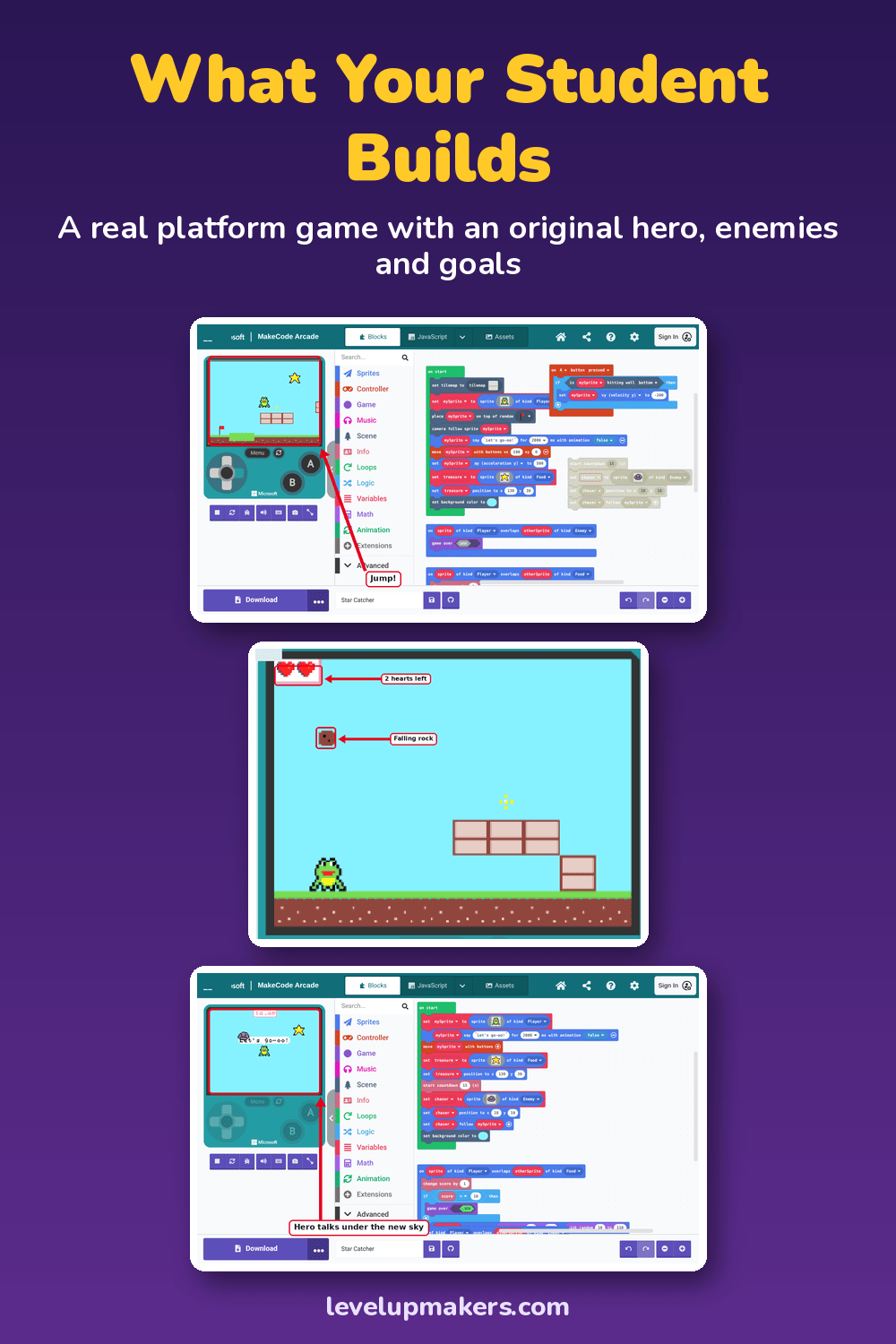
This is the game in Level 1, written out with screenshots for a grown-up and a student to follow. The hero moves, grabs an item, scores points, and races a clock. The build is marked about 30–45 minutes, inside a longer chapter that also covers the idea and the hero. Level 1 is free to read and print.
2. A dodge game
Something moves across the screen. The player slides out of the way. Touching it costs a life, or the game ends.
What they learn. The overlap from the collect game now has a second outcome. One sprite is safe to touch. Another is not. A forever loop can keep sending new hazards after "on start" has finished. That loop is the new idea. Lives are another number, like the score, except this one goes down.
Keep it small. One falling rock, or one sprite that slides across the screen, is a whole game. A stream of hazards can wait until the single one works. If the round ends on the first touch and they are frustrated, add three lives. The point is a rule they can explain, and a game someone else can play.
3. A maze
Walls, a start, and a goal. The hero walks the open path and cannot pass through a wall. Reaching the goal wins.
What they learn. MakeCode Arcade can paint a tile map. Some tiles are floor. Some are walls. They learn that the picture of a wall and the rule "you cannot walk here" are two different choices, and both have to be set. A goal can be a sprite, or a tile, at the end of the path. Winning is a place you reach, which is a different idea from a score that counts up.
Keep it small. The game screen is 160 by 120 pixels, so a short path is the right size. Draw the maze on paper first, and trace it with a finger so you both know it has an exit. A maze with no way through is a bug, and finding that bug is the lesson. Skip enemies on the first maze.
4. A simple platformer
Ground under the hero's feet, a jump, and one gap or one low hazard. The hero falls unless something holds them up.
What they learn. Gravity and jumping are blocks in MakeCode Arcade. Gravity is a number that pulls the hero down. A jump is a button event that pushes them up for a moment, and it has to be able to run again after the game has started. The ground has to be solid, or the hero falls through it.
Keep it small. One screen is the whole game. Scrolling, extra levels, and a boss can wait. The game is done when the hero can jump a gap and land, and your child can say what pulls them down.
A longer version of this idea is one platform game that grows from a first sprite to a game the family can play. That path is What Your Child Builds in 10 Levels. The written steps, including gravity, a jump, and a world that scrolls, are in Level Up: Make Your First Game with AI.
5. A pong-style game
A paddle the player moves up and down, and a ball that keeps moving. The ball bounces off the paddle and the edges. If it gets past the paddle, the other side scores, or the round ends.
What they learn. The ball is a sprite with its own direction. It keeps going when nobody is pressing a key. A bounce is a rule: when the ball hits the paddle or a wall, that direction changes. The score here marks a miss, which is a different job for a score than "I touched a coin."
Keep it small. One paddle is enough. The other side can be a wall that sends the ball back. A second player can be the next session. Draw an original paddle and ball. The feeling of a rally is the part worth borrowing. Famous names and pictures stay out of this game too.
How to tell the idea landed
Play the game yourself. Then ask your child to explain it with their hands off the mouse: what runs when the game starts, what the player does, which number changes, and how the game ends. "When I touch the coin, the score goes up by one" means the idea landed. "The computer does it" means stay with that game next time and change one block.
After it works, change one thing only: the picture, the speed, or the words on the win screen. Download the project, and stop while they still want another turn.
If they want a second game, take the next type on this list. Collect teaches the overlap and the score. Dodge adds a way to lose. The maze adds walls. The platformer adds gravity and a jump. The paddle game adds a sprite that moves on its own.
If you want the steps written out
These five games are small enough to try from a blank project, with you nearby. If you would rather follow screenshots for the first one, Level 1 is free to read and print. The rest of Level Up: Make Your First Game with AI is on the book page. The PDF is $15 and available now for immediate download. The paperback is on Amazon.
Microsoft and MakeCode are trademarks of the Microsoft group of companies. Level Up Makers is not sponsored or endorsed by Microsoft.
© 2026 Level Up Makers. All rights reserved.